
Practice ops
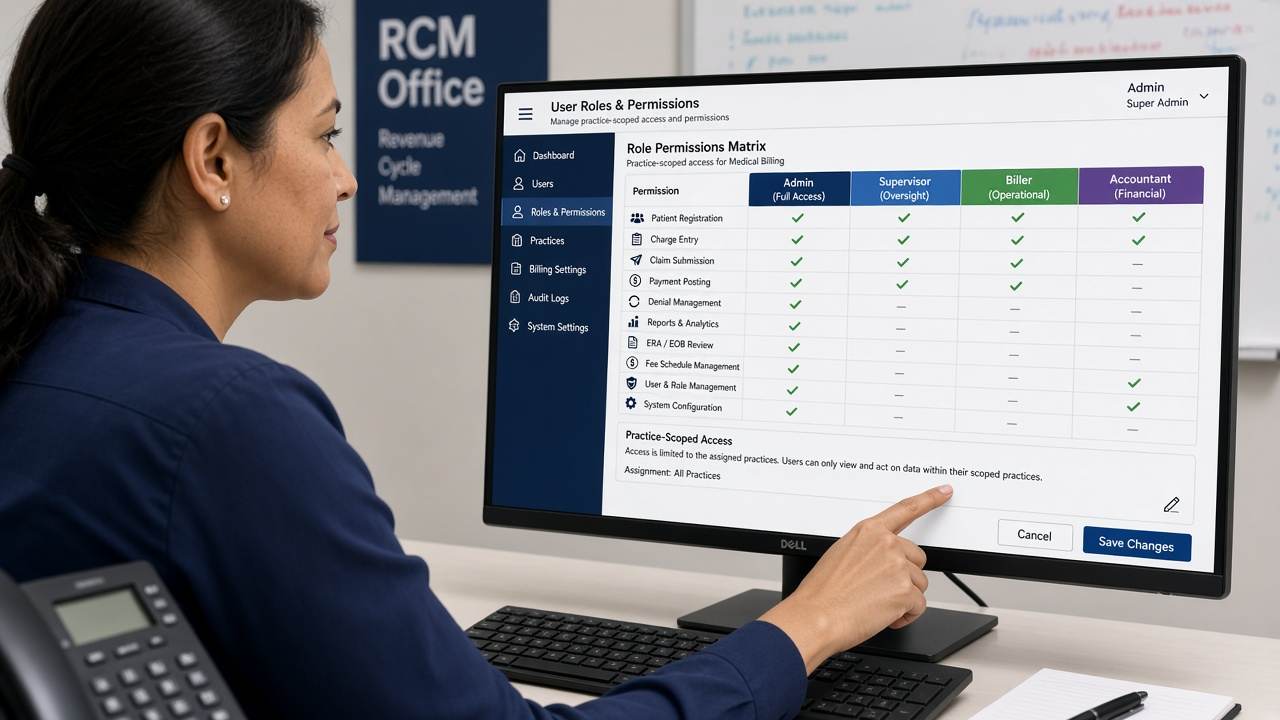
Roles & permissions
Four roles that match how billing companies actually work. Admin, Supervisor, Biller and Accountant. Each sees what their job needs and nothing more. When everyone is an admin, nobody is accountable. What ships here includes admin: full ops plus the admin console; supervisor: full ops, limited user creation. Used day to day by admin roles, with availability marked available. Open the sample screen, then walk the steps below — or book a demo and put your hand on the same flow with synthetic data.
Sample roles & permissions screen with synthetic data.
Admin console · users & practices
| User | Role | Practices | 2FA |
|---|---|---|---|
| T. Brooks | Supervisor | All | |
| K. Ahmed | Biller | Lakeview, Bayside | |
| L. Ortiz | Accountant | All (finance) | off |
Process
How roles & permissions works
- 1
Invite your team
Add users to your company account.
- 2
Assign a role
Admin, Supervisor, Biller or Accountant.
- 3
Scope billers
Limit billers to the practices they handle.
- 4
Secure sign-in
Signed-in sessions with optional two-factor in settings.
What it is
Admin, Supervisor, Biller and Accountant. Each sees what their job needs and nothing more. Accountants get finance and reports without the claims workbench; billers can be limited to their practices.
The problem it solves
When everyone is an admin, nobody is accountable. Real billing teams have clear lines between who builds, who approves and who reconciles.
What's included
Everything below is part of roles & permissions today.
- Admin: full ops plus the admin console
- Supervisor: full ops, limited user creation
- Biller: day-to-day claims and denials, practice-scoped
- Accountant: finance, reports and A/R only
- Optional two-factor authentication
- Role changes recorded in the audit log
The guardrail
Approvals and postings always carry the name of the person who made them.
Where it fits: tenancy model
Roles & permissions is one step in tenancy model. The workflow page shows every step around it, who owns each one, and where a person signs off.
Audience
Who uses it
Admin work with roles & permissions day to day. Access always follows what your admin assigns.

How it works
Medical billing professionals working claims and RCM in a US billing office
How it works
Four roles that match how billing companies actually work.
Admin, Supervisor, Biller and Accountant. Each sees what their job needs and nothing more. Accountants get finance and reports without the claims workbench; billers can be limited to their practices.
Proof points
- Admin: full ops plus the admin console
- Supervisor: full ops, limited user creation
- Biller: day-to-day claims and denials, practice-scoped
In practice
Medical billing professionals working claims and RCM in a US billing office
In practice
Where roles & permissions shows up
When everyone is an admin, nobody is accountable. Real billing teams have clear lines between who builds, who approves and who reconciles.
Proof points
- Invite your team
- Assign a role
- Scope billers
About this feature
Can we create custom roles?
The four roles cover most teams. Tell us if your structure is different.
Is two-factor required?
It's available in settings; many companies make it policy.
Can doctors log in?
MEDBIX isn't a clinical tool, so there's no doctor clinical login. Providers are billing entities in the system.
Want to walk MEDBIX against your real claim mix?
Thirty minutes with sample data. We'll follow one claim through the gate, then talk about your payers, practices and where the rework hurts today.
Notes from the billing floor
Occasional, practical writing on denials, A/R and running a billing company. No spam, unsubscribe any time.