
Practice ops
Client & CSV import
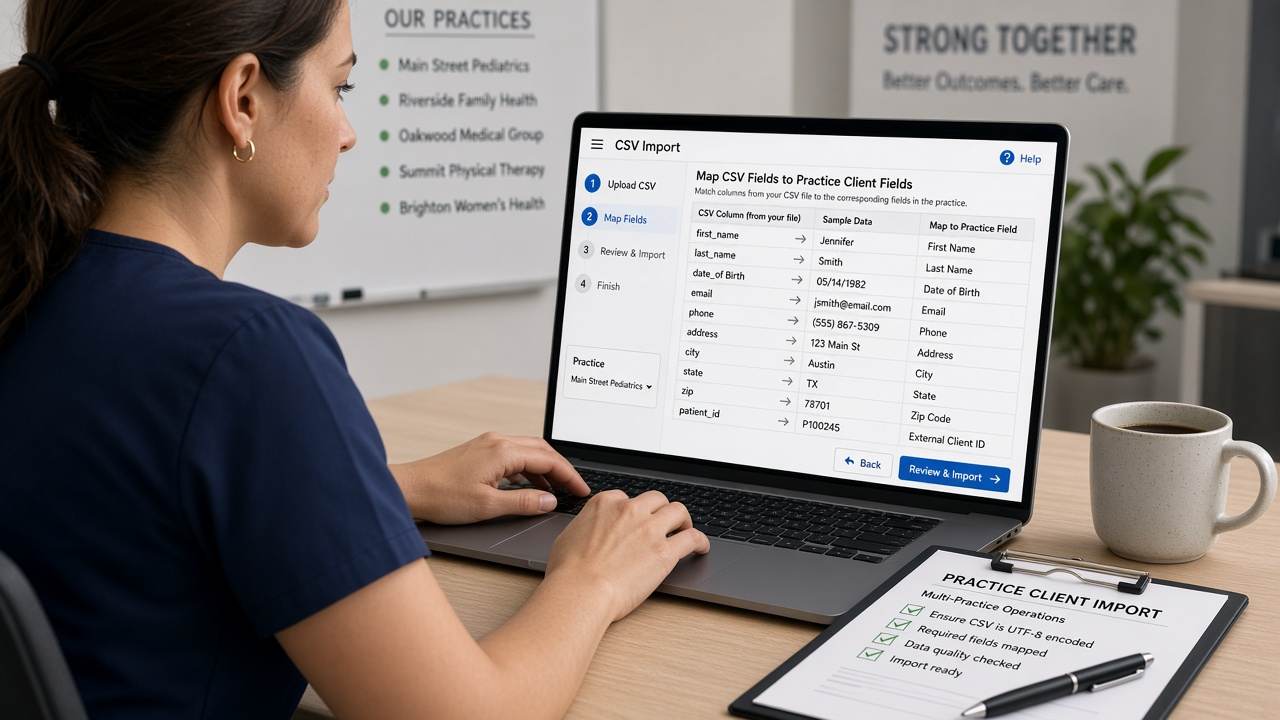
Bring a new client practice over in an afternoon, not a month. Import practices and reference data from CSV so onboarding a new client doesn't start with a week of typing. Every new client usually means re-entering providers, payers and patients by hand. What ships here includes csv import for practices and reference data; column mapping. Used day to day by admin, supervisor roles, with availability marked available. Open the sample screen, then walk the steps below — or book a demo and put your hand on the same flow with synthetic data.
Sample client & csv import screen with synthetic data.
Admin console · users & practices
| User | Role | Practices | 2FA |
|---|---|---|---|
| T. Brooks | Supervisor | All | |
| K. Ahmed | Biller | Lakeview, Bayside | |
| L. Ortiz | Accountant | All (finance) | off |
Process
How client & csv import works
- 1
Export from the old system
Start from a spreadsheet or CSV export.
- 2
Map the columns
Match your columns to MEDBIX fields.
- 3
Check before importing
Review issues before anything is written.
- 4
Start billing
The practice is ready inside your company account.
What it is
Import practices and reference data from CSV so onboarding a new client doesn't start with a week of typing.
The problem it solves
Every new client usually means re-entering providers, payers and patients by hand. That delay costs you the first month of collections.
What's included
Everything below is part of client & csv import today.
- CSV import for practices and reference data
- Column mapping
- Pre-import validation
- Imports scoped to the right tenant
- Repeatable for each new client
- Logged in the audit trail
The guardrail
Imports are checked before they're written, and they land only in your tenant.
Where it fits: tenancy model
Client & CSV import is one step in tenancy model. The workflow page shows every step around it, who owns each one, and where a person signs off.
Audience
Who uses it
Admin, Supervisor work with client & csv import day to day. Access always follows what your admin assigns.
How it works
Medical billing professionals working claims and RCM in a US billing office
How it works
Bring a new client practice over in an afternoon, not a month.
Import practices and reference data from CSV so onboarding a new client doesn't start with a week of typing.
Proof points
- CSV import for practices and reference data
- Column mapping
- Pre-import validation

In practice
Medical billing professionals working claims and RCM in a US billing office
In practice
Where client & csv import shows up
Every new client usually means re-entering providers, payers and patients by hand. That delay costs you the first month of collections.
Proof points
- Export from the old system
- Map the columns
- Check before importing
About this feature
Can you help with our first import?
Yes, onboarding includes help with your first client imports.
What if the CSV is messy?
Validation shows issues before anything is saved, so you can fix the file.
Can we import historical claims?
Talk to us about history; it depends on your source system.
Want to walk MEDBIX against your real claim mix?
Thirty minutes with sample data. We'll follow one claim through the gate, then talk about your payers, practices and where the rework hurts today.
Notes from the billing floor
Occasional, practical writing on denials, A/R and running a billing company. No spam, unsubscribe any time.