
Claims
Claim attachments (PWK)
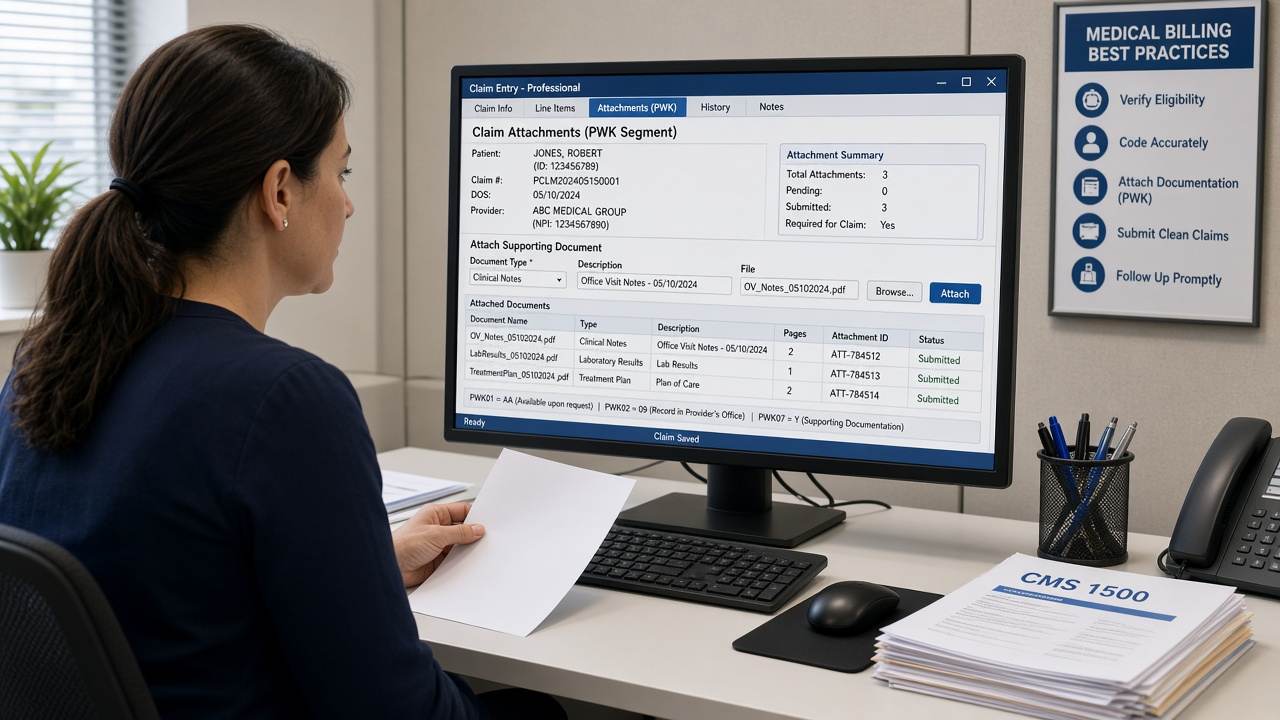
The paperwork travels with the claim, not with whoever remembers it. Supporting documents can be attached to professional claims and stay linked to them. When a payer asks for records, or a claim comes back denied, the original documents are one click away. Attachments usually live in shared drives and email threads. What ships here includes attachments on professional claims; visible to reviewers at the approval gate. Used day to day by biller, supervisor roles, with availability marked available. Open the sample screen, then walk the steps below — or book a demo and put your hand on the same flow with synthetic data.
Sample claim attachments (pwk) screen with synthetic data.
Coding assist · suggestions to review
Codes become final only when a coder accepts them one by one.
What it is
Supporting documents can be attached to professional claims and stay linked to them. When a payer asks for records, or a claim comes back denied, the original documents are one click away.
The problem it solves
Attachments usually live in shared drives and email threads. Six weeks later, the person working the denial can't tell what was actually sent with the claim.
Process
How claim attachments (pwk) works
- 1
Upload while building
Add documents during claim creation or afterwards from the claim detail page.
- 2
Label the purpose
Mark what each document supports so reviewers understand why it's there.
- 3
Review with the claim
Approvers see attachments next to the claim before they sign off.
- 4
Find it later
Denial work starts from the same claim record, attachments included.
What's included
Everything below is part of claim attachments (pwk) today.
- Attachments on professional claims
- Visible to reviewers at the approval gate
- Kept with the claim through corrections
- Access follows practice-level permissions
- No patient documents on shared drives
- Audit entry when files are added
The guardrail
Attachments follow the same tenant isolation as everything else; another billing company can never see them.
Where it fits: claim status lifecycle
Claim attachments (PWK) is one step in claim status lifecycle. The workflow page shows every step around it, who owns each one, and where a person signs off.
Audience
Who uses it
Biller, Supervisor work with claim attachments (pwk) day to day. Access always follows what your admin assigns.

How it works
Medical billing professionals working claims and RCM in a US billing office
How it works
The paperwork travels with the claim, not with whoever remembers it.
Supporting documents can be attached to professional claims and stay linked to them. When a payer asks for records, or a claim comes back denied, the original documents are one click away.
Proof points
- Attachments on professional claims
- Visible to reviewers at the approval gate
- Kept with the claim through corrections
In practice
Medical billing professionals working claims and RCM in a US billing office
In practice
Where claim attachments (pwk) shows up
Attachments usually live in shared drives and email threads. Six weeks later, the person working the denial can't tell what was actually sent with the claim.
Proof points
- Upload while building
- Label the purpose
- Review with the claim
About this feature
Which file types work?
Common document and image formats. We'll go through your typical attachments on a demo.
Do attachments copy over when we correct a claim?
They stay with the claim record, so the history of what was sent remains intact.
Who can view them?
Only staff with access to that practice inside your company account.
Want to walk MEDBIX against your real claim mix?
Thirty minutes with sample data. We'll follow one claim through the gate, then talk about your payers, practices and where the rework hurts today.
Notes from the billing floor
Occasional, practical writing on denials, A/R and running a billing company. No spam, unsubscribe any time.